

Last Updated On April 7, 2026 – Offers for properties under negotiated sale can now be submitted online using the same system used for Online Public Auction. Details below.
With the launch of the Pag-IBIG Online Public Auction (OPA) platform/system for their acquired assets, here are important things to help you with participating in their online auctions.
Note: This is a work in progress. I’ll add more as I discover more while using Pag-IBIG’s Online Public Auction platform/system.
Pag-IBIG Online Public Auction Registration
The first thing you need to do to participate is to register. Here is a quick step-by-step:
- Visit the Pag-IBIG online public auction registration page:
- Click on the “Proceed” button.
- Follow directions and provide all data as required until you finish.
- Wait for your Buyer ID which they will send via email.
What are the requirements
Here are the list of requirements as stated on the registration page in #1 above:
- ONE (1) VALID ID WITH SIGNATURE
- Photocopy or scanned copy of one(1) of your valid ID.
- Here is a list of acceptable ID’s (from Pag-IBIG’s website).
- Philippine Identification (PhilID) Card
- Passport including those issued by foreign governments
- Driver’s License
- Professional Regulation Commission (PRC) ID
- National Bureau of Investigation (NBI) Clearance
- Police Clearance
- Postal ID
- Voter’s ID
- Tax Identification (TIN) ID
- Barangay Certificate or Barangay IDs or similar documents bearing picture of the member
- Governments Service Insurance System (GSIS) e-Card
- Social Security System (SSS) Card
- Senior Citizen Card
- Overseas Workers Welfare Administration (OWWA) Card
- Overseas Filipino Worker ID
- Seaman’s Book or Seafarer’s Identification and Record Book (SIRS)
- Alien Certification of Registration/Immigrant Certificate of Recognition
- Government Office and GOCC ID, e.g AFP ID, Pag-IBIG Fund Loyalty Card
- ID issued by the National Council of Disability Affairs (NCDA)
- Department of Social Welfare and Development (DSWD) Certification
- Integrated Bar of the Philippines ID
- Company ID issued by Private Entities or Institutions Registered with or supervised or regulated either by the BSP, SEC or IC
- PhilHealth Health Insurance Card ng Bayan
- NOTE: For Housing related transactions, the following Valid IDs shall not be accepted:
- Barangay Certification or Barangay IDs or similar documents bearing picture of the Member.
- Company ID issued by Private Entities or Institutions Registered with or supervised or regulated either by the BSP, SEC or IC
- Maximum file size is 3MB.File format accepted (.png, .jpg, .jpeg, .pdf)
- SELFIE PHOTO
- Selfie photo showing your valid ID card. Take note of the following photo requirements (Submitted selfies that will not adhere to the guidelines will not be accepted and result to disqualification of your application):
- Solo colored picture with a clear or simple background
- Front facing, close-up selfie
- IDs must be clear and visible
- Wear appropriate attire
- No headgear, sunglasses, eyeglasses, or headphones
- File size should not exceed 3MB
- Maximum file size is 3MB.
- File format accepted (.png, .jpg, .jpeg, .pdf)
- Selfie photo showing your valid ID card. Take note of the following photo requirements (Submitted selfies that will not adhere to the guidelines will not be accepted and result to disqualification of your application):
- ACTIVE MOBILE NUMBER
- Philippine mobile number to receive the One-Time Pin (OTP).
- SECRETARY CERTIFICATE
- Applicable only for corporate or juridical bidders
- Photocopy or scanned copy of one(1) of your Secretary Certificate
- Maximum file size is 3MB.
- File format accepted (.png, .jpg, .jpeg, .pdf)
How To Bid Online in Pag-IBIG’s OPA
Note: The “Submit Offer” button will only be available DURING the period of acceptance of offers. The button will NOT SHOW before or after the period of acceptance of bids/offers.
Updated on April 7, 2026 – The second method described below does not work anymore. You can only submit bids/offers by going to this page: https://www.pagibigfundservices.com/OnlinePublicAuction/
- By searching for a target property:
- Go to Pag-IBIGs official website: https://www.pagibigfundservices.com/OnlinePublicAuction/ and search for your target property.
- If today’s date is within the period of acceptance of offers/bids, you will see the “Submit Offer” button.
- Click the Submit Offer button and follow instructions.
Using Pag-IBIG’s Property Finder tool (this does not work anymore. Pag-IBIG has deleted the property finder page).
Go to Pag-IBIG’s Property Finder Page: https://www.pagibigfundservices.com/OnlinePublicAuction/ListofProperties/PropertyFinder.
In the drop-down under “Search By”, choose ROPA ID and enter the ROPA ID of your target property as listed above and click the “Search” button.
You will see details of your target property with the Submit Offer button.
Click the Submit Offer button and follow instructions.
Want to get notified when this is updated? Subscribe for free updates!
Get new/updated foreclosed listings, auction schedules, property buying tips, and more, sent straight to your email inbox. It's free!
Pictures are now available!
Here’s a step-by-step on how to access the picture(s) for each property.
- Visit this page on Pag-IBIG’s website so see all lists of properties for sale: https://www.pagibigfundservices.com/OnlinePublicAuction
- Search/filter the list based on your preferred location, etc.
- You will notice the search results already include a photo on the left if pictures are available.
- Click on the “View More Details” link to see if more pictures are available.
Online submission of offers now available for Pag-IBIG Foreclosed Properties For Negotiated Sale
[Updated on May 21, 2025] – I just noticed that the latest batches for negotiated sale this May 2025 already has a “Hybrid” implementation.
This means interested buyers can now submit offers online (similar to how to submit bids) while still allowing the manual submission of offers through dropbox.
For example, here’s an excerpt from Batch # 15259 Invitation to submit offer:
Online Submission of Offers
4.1. Online submission of offers will be implemented for Retail Sale.
4.2. Interested buyers must register at the Pag-IBIG Fund website to get the Buyer ID needed to submit an offer. For those already with Buyer ID, no registration is required. The registration will require one (1) valid ID of the buyer (if individual buyer) or authorized representative (if company/corporation). The Buyer ID shall be issued three (3) working days from date of registration. Hence, registration must be done at least three (3) working days prior to the cut-off date of acceptance of offers.
4.3. From 12:00 a.m. on May 20, 2025, to 11:59 p.m. on May 24, 2025, the buyer shall enter his/her/its offer for the property at the Pag-IBIG Fund Acquired Assets page in the Pag-IBIG Fund website.
4.4. The buyer, using the Buyer ID may view the Status Tracker on Acquired Assets Webpage at the
Pag-IBIG Fund website.
Pag-IBIG Website still needs lots of improvements
Last July 29, 2025, I noticed Pag-IBIG’s page for foreclosed properties/acquired assets had a major update. While this is a welcome development, I can’t help but feel frustrated when I tried searching for properties in my preferred location(s).
It’s already April 2026 and the problems are still there.
Let me explain…
The Good
Let’s give credit where its due, this is a step in the right direction, and here are the things I like with this update:
1.All Pag-IBIG foreclosed properties and acquired assets are now in one database
- Since all properties are in a single database, you should be able to quickly find foreclosed properties in your preferred location (City).
- However this is limited because you won’t be able to search using specific keywords (for example, the name of your preferred subdivision). I discussed more about this under the “What needs improvement” section below.
2.Since this is a unified list of foreclosed properties, the tranche/batch numbers become less important.
- With so many schedules that include multiple batches/tranches, it can be overwhelming to keep track of them all. With all properties in one database, the batch/tranche numbers become less important. Instead, just search based on location.
- I mentioned the tranche/batch numbers are less important, but they are still important… because they are still there, each tranche/batch has a very short period of acceptance of bids/offers.
- Usually, you only have just 1 to 2 weeks to submit bids/offers. (I discussed more about this below). This means it is still a challenge to do proper due diligence when you find suitable properties because of limited time.
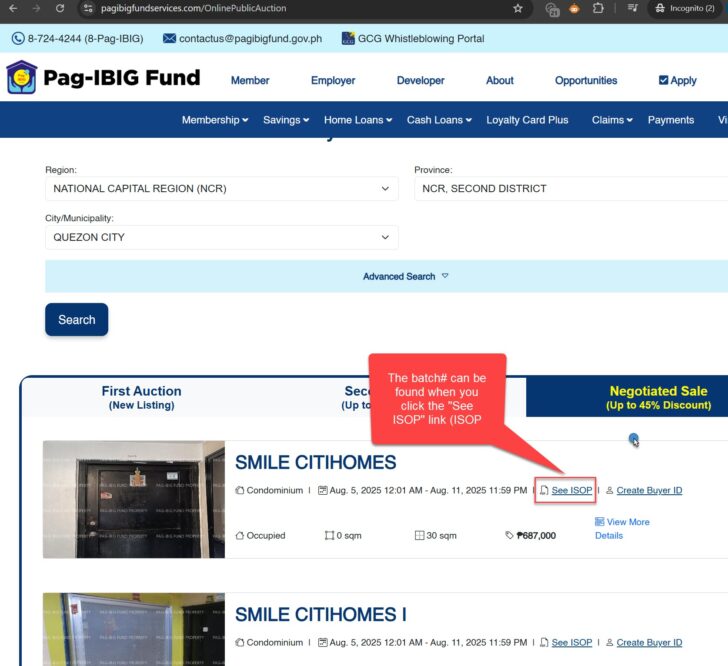
What needs improvement
I’m not bashing Pag-IBIG’s website, I sincerely want to help them improve it so that interested buyers can easily find properties in their preferred location, which would translate to more non-performing acquired assets getting disposed successfully. Here is a list of things they can improve:
1.You cannot search using keywords (to find a specific village/subdivision/condo/barangay, etc)
- For example, you are searching for foreclosed properties in Micara (In Tanza, Cavite). At the moment, you cannot search using the keyword “micara”.
- This means you will have to search for Tanza, Cavite foreclosed properties, and then scroll through all properties on the list and see which are located in Micara.
- This is okay if there are only few properties in Tanza. But what if there were hundreds? Then you will have to scroll through all of them to see all properties in Micara.
- How to fix this – They can simply add a box where you can enter a keyword that is included when searching.
Please refer to a screenshot of the search function on Pag-IBIG’s website for your reference:
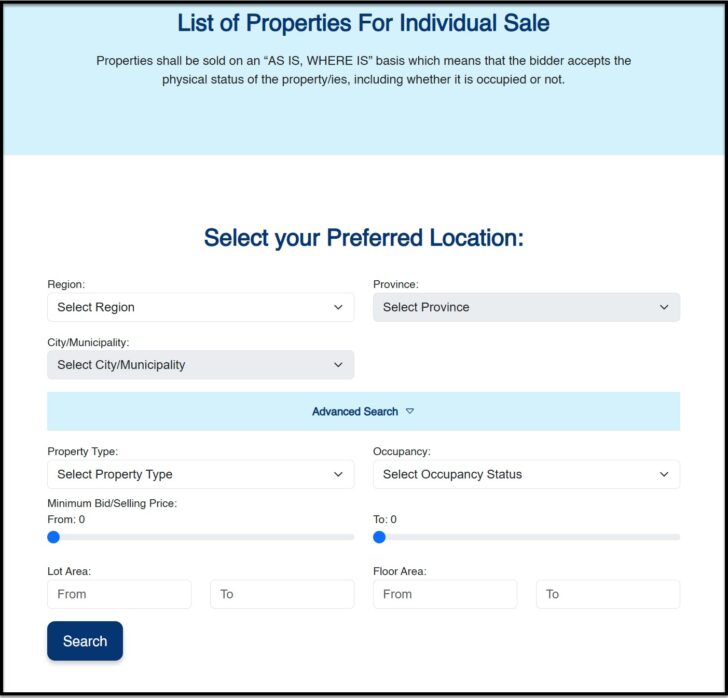
2.Too little time to do proper due diligence due to limited period of acceptance of bids/offers
- I noticed they still retained the usual 1 to 2 weeks period for acceptance of offers/bids for each batch/tranche
- This means that by the time you find a suitable property for you, you probably have only a few days left for proper due diligence.
- Keep in mind, you are buying real estate, which needs proper due diligence (can take weeks or even months to do). It’s not like we are buying a gadget at Lazada/Shopee where you can decide in a day and you’re also protected by a money back guaranty (foreclosed properties/acquired assets are for sale on an “As-is, Where-is” basis).
- Anyway, I believe that they have limited period for acceptance of offers/bids because they have so many batches/tranches and each will have their own schedule.
- How to fix this – I hope they would follow the process from other banks/government entities where they maintain one combined list with different contact persons and submission of bids/offers is on a monthly basis (this means no more multiple batches/tranches that have a very short period for acceptance of offers/bids).
3.You have to wait for a property to become part of a tranche/batch
- Since each Pag-IBIG batch/tranche has only a limited number of foreclosed properties, what happens to those that are not yet included with a batch/tranche? How about those that were not sold? For both, you can only hope that they will get included in the next batch/tranche. And there is no assurance that the next batch/tranche will include your target property since they limit the total number of properties to include. This can mean a very long wait.
- How to fix this – In contrast, other banks/government entities do it this way – They regularly conduct auctions/sealed biddings for newly foreclosed properties. Any property that remains unsold will be added to their list of properties for negotiated sale. They usually maintain only one big list that is for negotiated sale, which are all available anytime (no need to wait for the next batch). For me, this is a better process because you can expect all unsold properties to be available for sale.
4.You cannot share an individual listing from Pag-IBIG’s website
- With the current structure of Pag-IBIG’s website, each foreclosed property does not have its own unique web address called a uniform resource locator or URL. This means you cannot share a direct a link that will go to an individual foreclosed property listing. For real estate websites, I believe this is a very bad practice because there is no easy way to check the details of a property with a direct link.
- To verify this, go ahead, find a property on Pag-IBIG’s website and look at the address bar of your web browser. No matter which property it is you want to share, you will only see the same URL: https://www.pagibigfundservices.com/OnlinePublicAuction/
- How to fix this – This may sound like a major change because they will have to add a page for each listing. In reality, any content management system can do this programmatically.
- Since Pag-IBIG’s website does not currently have any keyword search function, combined with the lack of a URL for each listing, it would be very difficult to verify listings I share from Pag-IBIG’s website (you will have to search a location and scroll through all listings to find a target property). Because of this, I have decided to stop sharing listings from Pag-IBIG (see announcement below).
5.Too much unnecessary info required to search
- When I tried to search for properties in Tanza (Cavite), I had to guess which region Cavite was in and took several tries (Good thing I remembered Cavite is in CALABARZON but I felt like I was helping my daughter study for Araling Panlipunan… hehe), and then that’s the only time I can choose Tanza under City/Municipality. Is it really necessary to include the Region? I mean, does anyone actually think “Oh I want to find properties in Region 4A…“?! (See example screenshots below)
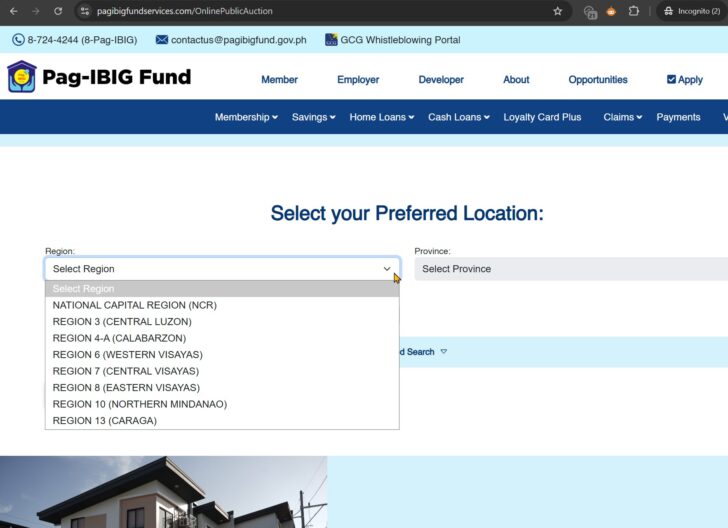
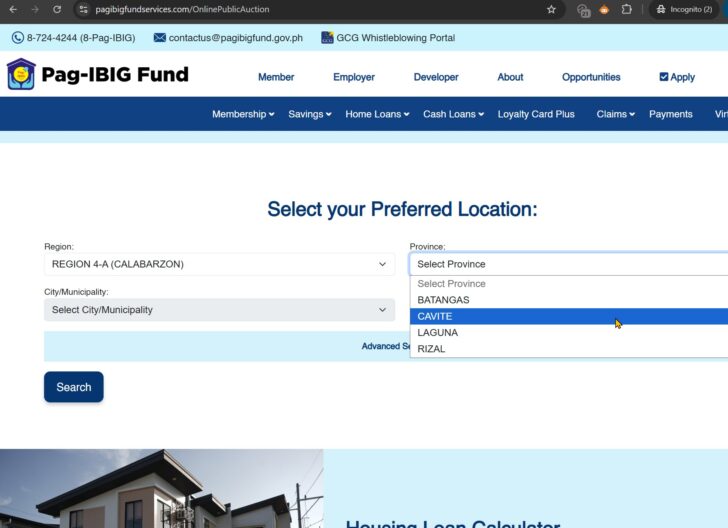
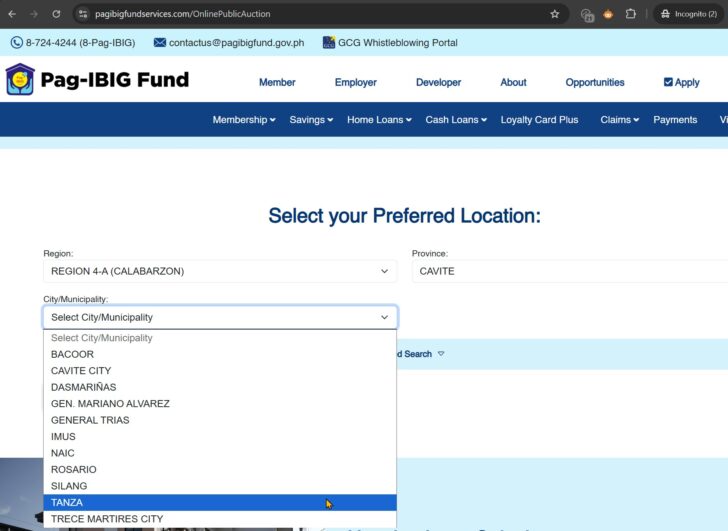
- For NCR, you have to choose which district a city belongs to before you can choose the city. I believe this is unnecessary. I mean, the district is not really important in my opinion (do you agree or disagree? Let me know in the comments).
- How to fix this – This is actually very easy, all they have to is to delete the “Region” field from the search form. For my NCR example, they can just remove all the districts and simply put NCR as the Province.
6.Too few properties per page in the search results
- After you manage to search for properties in your preferred City/Municipality, you will notice the search results only have 10 properties per page. This means if you have a lot of properties, you will have to load a lot of pages. This is okay if you only have few properties in the search results, but it can be frustrating if you have a lot of properties.
- For example, if there were 200 properties in Tanza under negotiated sale, you will have to load 20 pages to see all of them.
- How to fix this – They just have to increase the number of listings per page, which can easily get done.
7.You cannot sort the search results
- By default, listings are sorted according to price, with the cheapest showing first. This is good but I cannot sort by other values.
- Since each page of the search results only has 10 properties, it would make sense to have the ability to sort them so only those that fit your needs are shown first.
- For example, if you want to see the newest listings (which should mean you’ll have more time to do proper due diligence) you should be able to sort with newest listings first (or just have an option to sort according to the period of submission of bids/offers).
- How to fix this – They would have to customize their search form to include a sort function for search results. Any competent web/database developer should be able to do this.
8.Search results have 3 separate tabs (1st auction, 2nd Auction, Negotiated Sale)
- This adds another layer of complexity because you will have to click on each tab and scroll through all the listings to see all properties available. I believe it would be better if the search results would all be in a single tab for faster searching (and then they can just show info if a list is for 1st or 2nd auction, or under negotiated sale).
- How to fix this – This is very easy to fix, just point all search results to a single tab, and add the tranche/batch info on the listing details.
9.Search results appear to have too few properties (a bug?)
- When I wrote this article, I tried searching for properties in Quezon City, and noticed there were ZERO properties for 1st/2nd auction, I only found properties under negotiated sale. For me, this is hard to believe and I suspect there is something wrong or there is a bug in their search function.
- How to fix this – Again, any competent web/database developer should be able to troubleshoot and fix this.
10.You cannot share search results
- Even search results on Pag-IBIG’s website do not have any unique web address or URL. This means you cannot share search results. Perhaps this is the most annoying problem with their website. Sure, you can get a screenshot and share that. But if you want to verify and see the list of properties on Pag-IBIG’s website, you have to go through all the steps to do the search yourself (there is no direct link to the search results that can be shared).
- How to fix this – They will have to point search results to a unique web address or URL, which would include data that influences the search results (again, any competent web/database developer should be able to do this)
Note: My update with regard to Pag-IBIG’s updated website is a work in progress. I will continue to update this as the days go by.
Tip: How NOT to get blacklisted when submitting multiple bids/offers
With this new way fo submitting bids/offers, it is very easy to make multiple bids/offers.
But don’t get carried away.
Only submit multiple offers if you plan to buy all of them (in case all your offers win).
For example, let me quote item 6 in the general guidelines for OPA1520008:
“6. The bidder may submit bid offers for multiple properties provided he/she/they has/have the intention to purchase all the properties that will be won. In case the bidder will not pursue the purchase of any of the properties won, the sale shall be cancelled, and the Pag-lBIG Fund shall blacklist the bidder from the availment of programs on the sale of Pag-lBIG Fund Real and Other Properties Acquired (ROPA).”
Source: Invitation to bid for OPA1520008
In summary, if you submit multiple bids/offers, and you back-out with any winning bid/offer, YOU WILL GET BLACKLISTED!
I’ll say it again, only submit multiple bids/offers if you intend to purchase ALL OF THEM just in case ALL YOUR OFFERS/BIDS WIN!
Where are the list of Pag-IBIG foreclosed properties in PDF format?
With this new process of Pag-IBIG, they no longer include a downloadable PDF file that has a list of properties.
They don’t even include a downloadable invitation to bid with general guidelines in PDF format.
Got Questions?
If you have questions about Pag-IBIG’s Online Public Auction platform/system, let me know by leaving a comment below.
As mentioned at the beginning of this article, this is a work in progress. I’ll update this as I learn more about the Online Public Auction system/platform as I use it.
So if you have any questions, don’t be shy, ask them below (Hint: I welcome questions about the system/platform, but for questions regarding a property, you should ask Pag-IBIG directly)
Updated Pag-IBIG Foreclosed Properties For Sale Via Bidding/Negotiated Sale
Here’s the latest compilation of foreclosed properties from Pag-IBIG (updated weekly)









Gusto ko sana mag bid ng property pero diko alam kung paano at saan ako mag uumpisa, meron po ba na pwedeng mag assist, nahirapan po kasi ako, salamat
Hi George, saan ka ba nahihirapan sa process?
Eto may nahanap ako sa YouTube na tutorial video:
https://www.youtube.com/watch?v=Az0-Jw1cwiM
Thank u for the information i know.