How to calculate for the amortization factor
In my previous post: How to compute for the monthly amortization payment without a mortgage calculator, I showed how I compute for the monthly amortization payment by hand. Tyrone of Millionaire Acts through his comment asked: “How about if we don’t have access to the amortization factors table? Is there a way to compute it?”. I answered yes in my own comment and I would like to illustrate how it can be done through this post.
I got the following amortization factor formula when I reviewed for the November 2007 Real Estate Brokers Licensure Exam under Engineer Enrico Cruz:
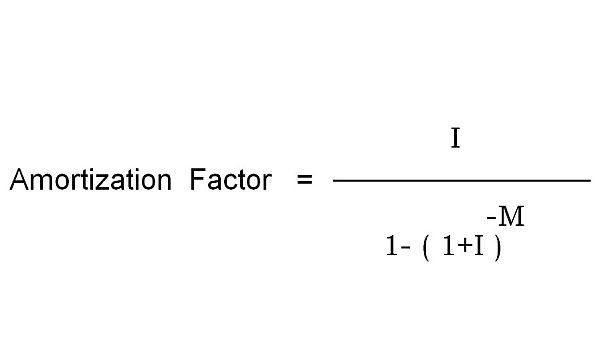
I
Amortization Factor = ———————————–
-M
1 – ( 1 + I )
Where:
I = the monthly interest rate. You can easily get this by dividing the annual interest rate by 12
M = the loan payment term in months. Just multiply the loan term by 12.
Let us use the same example in my previous post.
A foreclosed property is being sold for Php 1 Million and you can purchase it with only 20% down payment, with a maximum payment term of 10 years, at an annual interest rate of 12%. What would be the amortization factor you will use to compute for the monthly amortization?
First, let us compute for the Monthly Interest Rate (I) and the Loan payment term in Months (M)
I = Annual Interest rate/12
= 12%/12
= 1%
M = 10 years x 12 months/year
= 120 months
1%
Amortization Factor = ———————————–
-120
1 – ( 1 + 1% )
0.01
= ———————————–
-120
1 – ( 1+0.01 )
= 0.01434709
As you can see, we arrive at the same value for the amortization factor we used in my previous example. Of course I would only use the formula in excel as I would not want to compute this by hand, it would be very difficult to calculate for a number with a negative exponent like that in the example right?!
I would still prefer to keep a copy of the amortization factor table in my wallet so I don’t need to bring my laptop with me everywhere. I can then compute by hand or use the calculator on my cellphone. By the way, I believe there is also a built-in function in excel that can do this calculation but I haven’t tried it yet.
Easy right?!
—
To our financial freedom!
Jay Castillo
Real Estate Investor
Real Estate Broker License #: 20056
Blog: http://www.foreclosurephilippines.com
Click here to contact me via E-mail
Mobile phone (Call/SMS): +639178843882
Twitter: http://twitter.com/jay_castillo
Facebook: Foreclosure Philippines fan page
Text by Jay Castillo. Copyright © 2009 All rights reserved.
P.S. – If you are a new visitor, please start here to learn more about foreclosure investing in the Philippines.
P.P.S – If you feel that anyone else you know might benefit from this post, please do share this to them and don’t forget to subscribe to e-mail alerts and get notified of new listings of bank foreclosed properties, public auction schedules, and real estate investing tips. If your inbox is getting full, you may subscribe through my RSS Feed instead.
Related posts:
- How to compute for the monthly amortization payment without a mortgage calculator
- How To Easily Calculate The Return-On-Investment (ROI) For Rental Properties
- Reader Q and A #1: How can I apply for a loan and thus finance my first deal?
Tagged with: amortization factor • amortization factor formula • amortization factor table • amortization factors table • amortization payment • Foreclosed properties • Loan • mortgage calculator • real estate broker • reale estate
Filed under: Real Estate Investing


you are so helpful and selfless! thanks for putting up this blog
Thanks Mildred, I really appreciate your kind words!
Hi Jay,
I appreciate very much the knowledge you’re sharing. I just want to find out how to do the formula you gave (the one with a negative exponent) on Excel. Thanks so much.
Hi Gil, to enter a negative exponent in excel, you can use ^-X where X is the exponent. You can also download this file to see an example: http://www.foreclosurephilippines.com/wp-content/uploads/2009/09/amortization_table(Unionbank).xls
By the way, you can also use the PMT function in Excel:
PMT function: Calculates the payment for a loan based on constant payments and a constant interest rate.
Syntax
PMT(rate,nper,pv,fv,type)
For a more complete description of the arguments in PMT, see the PV function.
Rate is the interest rate for the loan.
Nper is the total number of payments for the loan.
Pv is the present value, or the total amount that a series of future payments is worth now; also known as the principal.
Fv is the future value, or a cash balance you want to attain after the last payment is made. If fv is omitted, it is assumed to be 0 (zero), that is, the future value of a loan is 0.
Type is the number 0 (zero) or 1 and indicates when payments are due.
Set type equal to If payments are due
0 or omitted At the end of the period
1 At the beginning of the period
Remarks:
The payment returned by PMT includes principal and interest but no taxes, reserve payments, or fees sometimes associated with loans.
Make sure that you are consistent about the units you use for specifying rate and nper. If you make monthly payments on a four-year loan at an annual interest rate of 12 percent, use 12%/12 for rate and 4*12 for nper. If you make annual payments on the same loan, use 12 percent for rate and 4 for nper.
Tip To find the total amount paid over the duration of the loan, multiply the returned PMT value by nper.